Sticker Notes: Adding Playful Energy to Your Design Projects
Every designer hits a wall sometimes. You’ve got the layout done, the copy is solid, the serif font for the body text is perfectly readable, and your sans serif font headlines look clean. But there is something missing. It lacks that spark, that tactile feeling that makes a viewer want to reach out and touch the screen. When you need to inject a dose of personality and playful chaos into a project without breaking the design system, you often have to look beyond standard typography. This is where specialized tools like Sticker Notes come into play, offering a unique solution for visual storytelling.
Understanding the Dingbat Font Concept
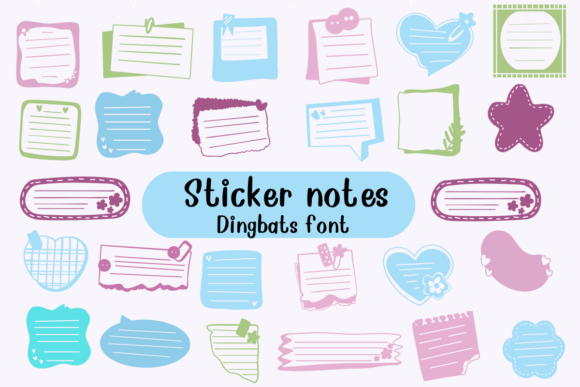
Before diving into specific applications, it helps to understand exactly what you are working with. Sticker Notes is technically classified as a dingbat font, but in modern usage, we often refer to these as icon fonts or symbol typefaces. Unlike a traditional handwritten font or script font where typing "A" gives you the letter A, a dingbat font assigns vector graphics to keyboard keys. When you install Sticker Notes, you gain access to a library of sticky note shapes and designs mapped to your standard keyboard.
The visual characteristic of this premium font is immediately distinct. It captures the essence of physical stationery—the slightly curled edges, the vibrant colors, and the adhesive look. It bridges the gap between digital design and physical crafting. Because it is a vector-based typeface, you can scale these graphics to any size without pixelation. This makes it a versatile design asset for both small web icons and large-format posters. The personality of the font is inherently informal and energetic. It signals to the viewer that the content is accessible, fun, and not to be taken too seriously.
Strategic Applications in Branding and Marketing
For entrepreneurs and small business owners, maintaining a consistent brand identity is crucial. However, not every brand needs to be stiff and corporate. If your brand voice is friendly, youthful, or educational, Sticker Notes can become a staple in your visual toolkit. It works exceptionally well for businesses targeting younger demographics or those in the creative and educational sectors.
Consider your social media graphics. On platforms like Instagram or TikTok, visual noise is high. A standard text overlay often gets scrolled past. By using Sticker Notes to frame a key piece of information or highlight a "call to action," you create a visual break that stops the scroll. It simulates the experience of a friend passing you a physical note. This is particularly effective for flash sales, quick tips, or user-generated content highlights.
Furthermore, this creative font shines in packaging design. Imagine a coffee brand or a stationery shop. Using standard clip art can look generic, but using a cohesive set of sticky note graphics from this font ensures that every label, sticker, and tag shares the same line weight and aesthetic style. It helps in building a recognizable visual language that customers associate with your specific products.
Editorial Design and Content Creation
Publishers and bloggers often struggle with making long-form content digestible. While a good font pairing of a readable body text and a bold heading is the foundation, Sticker Notes offers a way to add editorial flair without cluttering the page. In editorial design, such as magazines or newsletters, these graphics can serve as pull quotes or sidebar highlights.
Instead of using a standard blockquote style, a designer can place a quote inside one of the sticky note characters. This draws the eye specifically to that text, creating a focal point within the article. It adds a layer of depth to the layout, making the publication feel more curated and less like a generic word processor document. For content creators making PDF guides or lead magnets, these elements help break up text walls, improving the reader's experience and retention of information.
Practical Guide to Using Sticker Notes Effectively
Integrating a display font like this requires a bit of restraint and strategy. Because the visual elements are so distinct, overusing them can quickly make a design look cluttered or childish. Here is how to evaluate the fit and apply the font professionally:
- Evaluate the Tone: This font is not suited for legal documents, serious corporate reports, or luxury jewelry branding. It fits best in casual, educational, or retail environments. If your brand strategy relies on "approachable" and "friendly," this is a match.
- Color Coordination: Since the font features colorful designs, ensure the colors within the sticky notes complement your brand palette. If the notes are too bright against a neon background, the readability of your main message might suffer.
- Font Pairing: Do not pair Sticker Notes with another highly decorative font. The best approach is to use it alongside a clean, geometric sans serif font. This contrast ensures that the playful elements stand out while the text remains legible.
- Testing for Hierarchy: Use the sticky notes to establish visual hierarchy. Place your most important offer or key takeaway inside a note. The distinct shape will naturally prioritize that information over the surrounding paragraph text.
Technical Considerations for Web and Print
When using Sticker Notes for web design, remember that while it is a font, the browser treats it as text. This is actually an advantage over PNG images because the load time is usually faster, and the graphics scale perfectly on mobile devices. However, for logo design, it is generally recommended to convert the font to outlines (vectors) once the design is finalized. This ensures that the logo displays correctly even if the font file isn't installed on a specific user's computer or print machine.
Regarding licensing, Sticker Notes is a commercial font. This means you typically need to purchase a license based on your usage. If you are a freelancer creating a logo for a client, you usually need a license that covers the number of users or the specific project scope. Always review the license agreement. Most premium font licenses cover standard commercial use, but if you plan to use it in a mobile app or an embedded web server, you may need an extended license.
Creative Applications for Crafters and Hobbyists
Beyond the professional sphere, Sticker Notes is a delight for hobbyists. If you are creating invitations for a birthday party, a baby shower, or a casual get-together, this typeface eliminates the need to buy digital stickers from a marketplace. You have an entire library of designs at your fingertips. You can print them out, cut them, and use them in scrapbooking or physical planners.
For educators, this font is a game-changer for creating worksheets. Instead of plain bullet points, you can use different sticky note shapes to categorize information or create interactive "cut and paste" activities for students. It adds a tactile quality to the learning materials that engages students more effectively than standard black-and-white text.
Conclusion
In the vast ocean of typography, Sticker Notes occupies a specific, valuable niche. It is not a workhorse font for body copy, nor is it a serious serif font for academic papers. It is a tool for expression. For the designer looking to add a human touch, the marketer aiming to catch an eye, or the crafter wanting to add color, this typeface provides a reliable and high-quality solution. By understanding its personality and applying it with strategic intent, you can elevate your projects from simply informative to genuinely engaging.